
Reading is how you play!
There is no need to rush in DaDeep. Read each scene, discover clues and decide what to do next. Here is how the controls work.
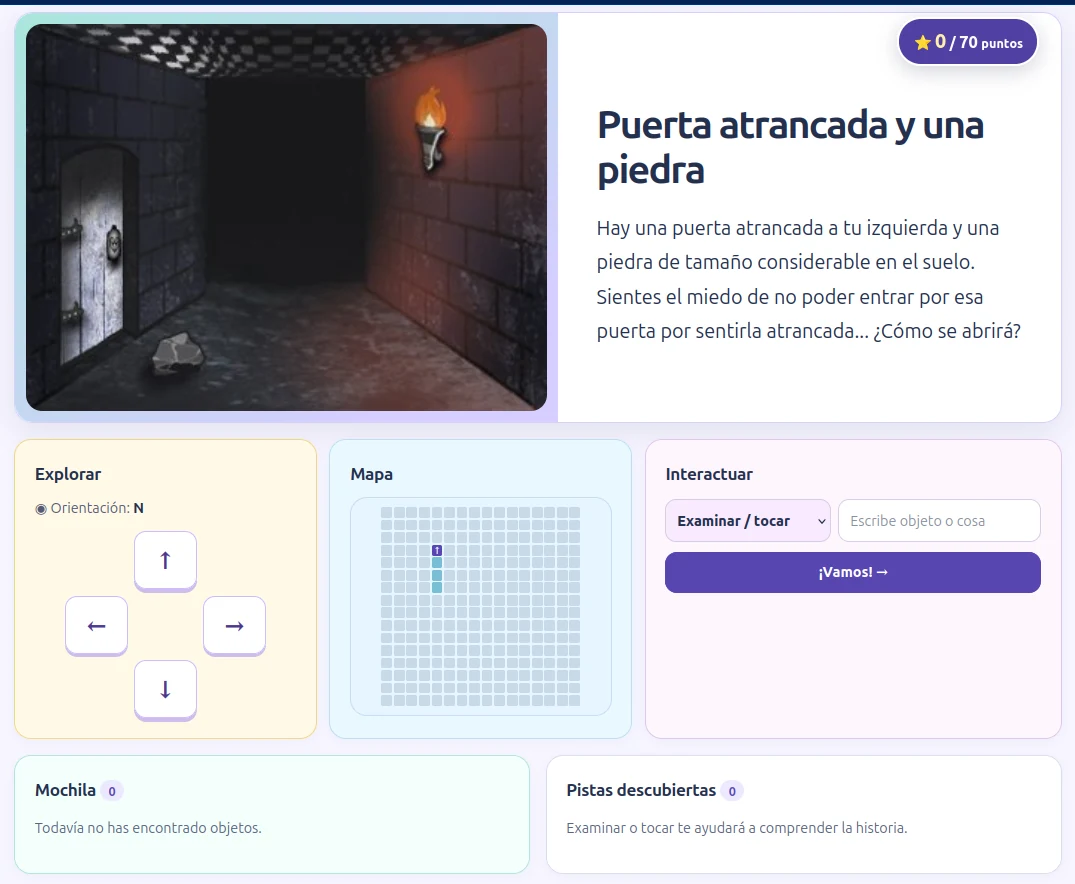
How to play, step by step
Come back to this guide whenever you need help.
Choose your character
Select “Start playing”, pick a nickname and draw a pixel-art avatar if you like. Press “Save character”.
Pick an adventure
Choose “Play” from the adventures list. If you have played before, you can “Continue” or start a “New game”.
Read the scene
Look at the illustration, if one is shown, and carefully read the title and description. A clue may be hidden in a sentence.
Explore with the arrows
Use ↑ ↓ ← → to move. Check your map to get your bearings and remember where you have been.
Interact with words
Choose “Examine”, “Take”, “Say” or “Listen”. Type an object or word when asked; “Listen” needs no text.
Use your backpack
Items you collect appear in your backpack. You may “Use” one or “Combine” two when the adventure allows it. Read any clues you have found.
Keep reading to progress
Your decisions can unlock scenes and earn ⭐ points. Returning in the same browser lets you continue your save.
Three things to remember
- The arrows cannot always take you forward: a door or obstacle may block the way. Read the explanation.
- Not every object can be picked up. Sometimes you must examine it or solve something first.
- Your progress is stored in this browser. Deleting its data or switching devices may mean losing your save.
Ready to explore?
Choose your character and start discovering stories. Play at your own pace.